
The EnsureMail Ultimate platform installs as Microsoft Exchange on your desktop, offering seamless integration with Outlook on both Windows and macOS. This enables full synchronization of emails, contacts, calendars, notes, and tasks between Outlook and webmail.
Apple Mail / Mac Mail for macOS:
Open the Mail app and go to File > Add Account.
Choose Microsoft Exchange
On the next screen, fill in your name and Email and click on “Sign In."
Select “Configure Manually.”
Enter your password again on the next screen
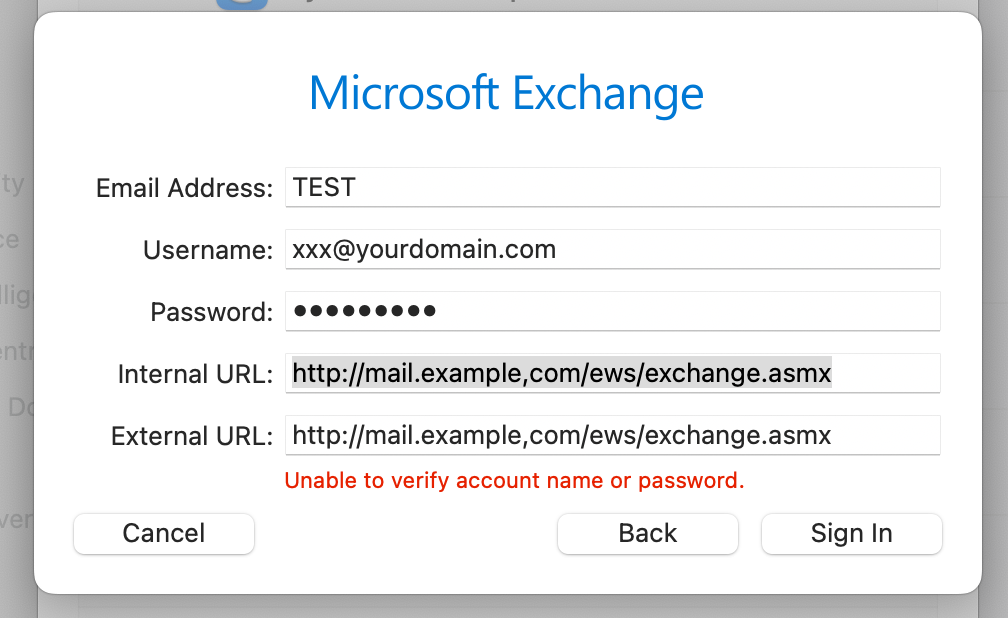
You might get a red "Unable to verify account name and password" with the box to supply Internal URL and External URL, disregard and
enter in the Internal and External URL:
http://mail.example,com/ews/exchange.asmx , where 'example,com' is your domain name, for example, http://mail.ultimatesrvr.de/ews/exchange.asmx
In the next box, select all options and click Done.
Note: The mailbox may take one to two minutes to set up, depending on its size.